









SharePoint: Using the Keyword Query for Search Driven Applications

SharePoint: Using the Keyword Query for Search Driven Applications
Let’s assume this: you want to create a custom application (e.g. a webpart) that should be used as a Search driven Application. This custom application should display all documents belonging to a predefined content type and it should use the SharePoint search index only to retrieve all matching documents and some of their metadata. One way to start is to have a look on the KeywordQuery object. With the KeywordQuery object a result table can be requested from SharePoint Search based on a keyword query – almost the same way as you would type in your query to a SharePoint search box manually.
Let’s have a look on a code sample:
1: DataTable ExecuteKeywordQuery(string queryText)
2: {
3: DataTable retParam = null;
4:
5: if (false == string.IsNullOrEmpty(queryText))
6: {
7: using (new SPMonitoredScope(“ExecuteKeywordQuery“))
8: {
9: var proxy (SearchServiceApplicationProxy)SearchServiceApplicationProxy. GetPro(SPServiceContext.GetContext(SPContext.Current.Site));
10: var query = new KeywordQuery(proxy);
11: query.ResultsProvider = Microsoft.Office.Server.Search.Query.SearchProvider.Default;
12: query.QueryText = queryText;
13: query.ResultTypes |= ResultType.RelevantResults;
14:
15: ResultTableCollection searchResults = new ResultTableCollection();
16:
17: try
18: {
19: searchResults = query.Execute();
20: }
21: catch (Microsoft.Office.Server.Search.Query.QueryMalformedException ex)
22: {
23: // Something wrong with the query
24: }
25: catch (Microsoft.Office.Server.Search.Query.InvalidPropertyException ex)
26: {
27: // Invalid managed property
28: }
29:
30: if (searchResults.Exists(ResultType.RelevantResults))
31: {
32: ResultTable searchResult = searchResults[ResultType.RelevantResults];
33:
34: DataTable result = new DataTable(“Result”);
35: result.Load(searchResult, LoadOption.OverwriteChanges);
36:
37: retParam = result;
38: }
39: }
40: }
41:
42: return retParam;
43: }
This custom method ExecuteKeywordQuery() takes a query string, starts a query on the SharePoint Search index and returns the results as a DataTable object. Let’s see how the results look like. In my example I have created a new Content Type (called MyContentType) and attached this new Content Type to a library. After that I added some sample documents and started a full crawl.
My sample library looks like this:

You’re right – this is a SP2010 screenshot. I’m currently working on a SP2010 project and that’s why I fired up my SP2010 VM to get the code samples and the screenshots for this post.
OK – back to SharePoint. The full crawl is finished and I start a first manual check by typing in this query ContentType:‘MyContentType‘
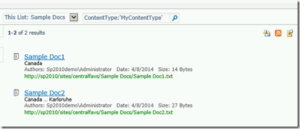
When entering a query string manually the two sample documents are found based on their content type. That’s expected!
Now let’s see how the KeywordQuery object builds the result table. I use the F5-deployment in Visual Studio to run the solution and my custom method ExecuteKeywordQuery() gets called:
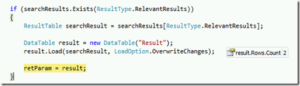
As you can see in the above screenshot the resulting DataTable has two rows. That’s again expected because there are two documents matching the current query.
But how does the DataTable look like?
1: result.Columns[0]; // WorkId
2: result.Columns[1]; // Rank
3: result.Columns[2]; // Title
4: result.Columns[3]; // Author
5: result.Columns[4]; // Size
6: result.Columns[5]; // Path
7: result.Columns[6]; // Description
8: result.Columns[7]; // Write
9: result.Columns[8]; // SiteName
10: result.Columns[9]; // CollapsingStatus
11: result.Columns[10]; // HitHighlightedSummary
12: result.Columns[11]; // HitHighlightedProperties
13: result.Columns[12]; // ContentClass
14: result.Columns[13]; // IsDocument
15: result.Columns[14]; // PictureThumbnailUrl
16: result.Columns[15]; // ServerRedirectedURL
These are the standard ‘properties’ that are used in the resulting DataTable. In my example the resulting DataTable has two rows (because there are two documents matching the query) and 16 columns.
With these 16 standard columns you can create a simple view on the documents matching the query. For example: the custom search driven application can display the document’s name, the document’s title and the author. The ‘Path’ property can be used to create a hyperlink to each document. That’s ok, but in a real word scenario the content types have additional (custom) fields with additional metadata. And these additional metadata should also be added to the resulting DataTable now. So let’s beef up this example. I add a Managed Metadata column (called Devision) to the content type and assign a devision to each document (and I also add another document to the library).
Now the library with the sample documents looks like this:

After another full crawl I repeat my manual test with this query: ContentType:’MyContentType’ AND Devision:’Devision 1′. The following screenshot shows the result:
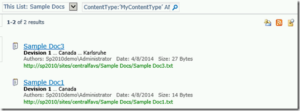
This is the expected result. The search result shows all documents that are belonging to the content type ‘MyContentType‘ and that are tagged with ‘Devision 1‘. Let’s see how to do that with the KeywordQuery object.
The KeywordQuery object
The KeywordQuery object exposes a collection namedSelectedProperties. This collection can be used to add additional properties to the resulting DataTable. In my code example I add the managed metadata ‘Devision‘ to the KeywordQuery (line 15) and the code sample now looks like this:
1: DataTable ExecuteKeywordQuery(string queryText)
2: {
3: DataTable retParam = null;
4:
5: if (false == string.IsNullOrEmpty(queryText))
6: {
7: using (new SPMonitoredScope(“ExecuteKeywordQuery”))
8: {
9: var proxy = (SearchServiceApplicationProxy)SearchServiceApplicationProxy. GetProxy(SPServiceContext.GetContext(SPContext.Current.Site));
10: var query = new KeywordQuery(proxy);
11: query.ResultsProvider = Microsoft.Office.Server.Search.Query.SearchProvider.Default;
12: query.QueryText = queryText;
13: query.ResultTypes |= ResultType.RelevantResults;
14:
15: query.SelectProperties.Add(“Devision”);
16:
17: ResultTableCollection searchResults = new ResultTableCollection();
18:
19: try
20: {
21: searchResults = query.Execute();
22: }
23: catch (Microsoft.Office.Server.Search.Query.QueryMalformedException ex)
24: {
25: // Something wrong with the query
26: }
27: catch (Microsoft.Office.Server.Search.Query.InvalidPropertyException ex)
28: {
29: // Invalid managed property
30: }
31:
32: if (searchResults.Exists(ResultType.RelevantResults))
33: {
34: ResultTable searchResult = searchResults[ResultType.RelevantResults];
35:
36: DataTable result = new DataTable(“Result”);
37: result.Load(searchResult, LoadOption.OverwriteChanges);
38:
39: retParam = result;
40: }
41: }
42: }
43:
44: return retParam;
45: }
To be able to use a SelectedProperty I first need to create a new Managed Property in the Search Service Application. So I create a new Managed Property (called Devision) and assign it to the appropriate Crawled Property. After that I start a new full crawl.
After the full crawl is finished it’s time to run the modified code:
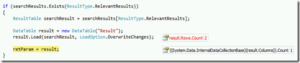
As expected the resulting DataTable again has two rows because two documents are matching the query, but the resulting DataTable only has one column now! That was not expected.I just added another property and so I expected the resulting DataTable to have one more column as before now! Why does the resulting DataTable has only one column – and not 17 as expected?
Let’s have a closer look on the column:
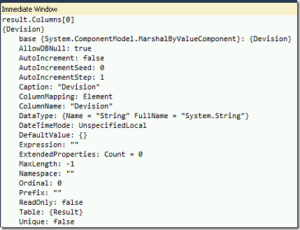
The resulting DataTable only has one column now – and it’s the Devision column! Where are the other columns (Title, Path, Autor, …)?
As soon as SelectedProperties are used the ‘standard’ properties are removed from the resulting DataTable. Think of the standard properties as ‘standard selected properties’. Explained in simple words: As soon as you add a SelectedProperty the KeywordQuery ‘removes’ all other SelectedProperties.
But there’s a workaround: just add the ‘standard’ properties as new SelectedProperties. To check this I added ‘Title’ and ‘Author’ as additional selected properties. My code sample now looks like this:
1: DataTable ExecuteKeywordQuery(string queryText)
2: {
3: DataTable retParam = null;
4:
5: if (false == string.IsNullOrEmpty(queryText))
6: {
7: using (new SPMonitoredScope(“ExecuteKeywordQuery”))
8: {
9: var proxy = (SearchServiceApplicationProxy)SearchServiceApplicationProxy. GetProxy(SPServiceContext.GetContext(SPContext.Current.Site));
10: var query = new KeywordQuery(proxy);
11: query.ResultsProvider = Microsoft.Office.Server.Search.Query.SearchProvider.Default;
12: query.QueryText = queryText;
13: query.ResultTypes |= ResultType.RelevantResults;
14:
15: query.SelectProperties.Add(“Title”);
16: query.SelectProperties.Add(“Author”);
17: query.SelectProperties.Add(“Devision”);
18:
19: ResultTableCollection searchResults = new ResultTableCollection();
20:
21: try
22: {
23: searchResults = query.Execute();
24: }
25: catch (Microsoft.Office.Server.Search.Query.QueryMalformedException ex)
26: {
27: // Something wrong with the query
28: }
29: catch (Microsoft.Office.Server.Search.Query.InvalidPropertyException ex)
30: {
31: // Invalid managed property
32: }
33:
34: if (searchResults.Exists(ResultType.RelevantResults))
35: {
36: ResultTable searchResult = searchResults[ResultType.RelevantResults];
37:
38: DataTable result = new DataTable(“Result“);
39: result.Load(searchResult, LoadOption.OverwriteChanges);
40:
41: retParam = result;
42: }
43: }
44: }
45:
46: return retParam;
47: }
You can see my changes in line 15 and line 16.
Let’s see how the resulting DataTable looks now:
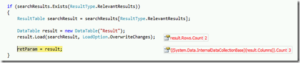
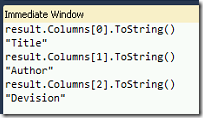
Much better! As expected the resulting DataTable now has three columns (because I used three selected properties). And the columns are the expected ones:
With the KeywordQuery object you can create powerful custom Search Driven Applications that get all their properties from the Search Index. With the SelectedProperties collection of the KeywordQuery object you can define the layout of the resulting DataTable according to the requirements.
If you have any questions on the above blog post, please leave a comment below.

Tags
trending posts