









Two Easy Ways to Calculate Working Days Inside a SharePoint Workflow

Contents
Introduction
Are you able to calculate inside a SharePoint Workflow?
I’m in the midst of two different major SharePoint Workflows for clients right now, one of them being an HR New Hire Onboarding request and approval process. One small but critical requirement of the process was that each level of approval needed a two business day wait period. I’ve seen different suggested solutions for this on the internet, but nothing super easy and in the context of a workflow, or would fully work in my situation. So I thought I’d share a couple of quick and easy ways to accomplish this.
Background of My Solution
Before I get into the specifics, let me just give a quick rundown of the different parts of my process that I have going on.
■InfoPath web form published to a SharePoint form library
■SharePoint data connection library containing a UDC data connection via Secure Store to the User Profile Service, thanks claims authentication
■SharePoint Reusable workflow (as I’m using the workflow in two different libraries)
■SharePoint list for the business day calculation
All of the approval is tracked in the InfoPath form, not the workflow. The process goes like this:
1.A manager comes to the HR site and fills out a new hire request form
2.HR reviews the form, and starts the approval workflow
3.The workflow sends out email for level 1 approver
4.Wait 2 business days
5.If not approved, look up level 2 approver
6.Email level 2 approver
7.Wait 2 business days
8.etc…
The process continues until we hit the CEO at which case we stop and redirect to HR. None of all that matters per say, but I just wanted to give you some context of where we’re at. What I needed was to figure out how to calculate and set a future date 2 working days from that current point in time, which there would be multiple in the same workflow context. But I also needed to set the 2 working days for the END of the day at 5pm.
Why Other Solutions Didn’t Work
SharePoint workflow (neither 2007, 2010 or 2013) has a built-in action to do the calculation, similar to like a NETWORKDAYS formula in Excel. Ok, so then I turned to posts online talking about using a calculated column to do the formula. Cool I think we’re on to something. But as I got to thinking, it wouldn’t fly. So I can create a calculated column on my form library, but that is only updated when the form itself is updated. Besides, the Created and Modified won’t work either, because neither would be the exact current date/time. I also didn’t have to write some complex Visual Studio based workflow. No thanks. So I devised a similar solution using a separate SharePoint list whose sole purpose is to do the calculation. It’s extremely simple and works just fine.

Solution 1 – Use an outside SharePoint list
Let’s get the basics set up:
■Create a new SharePoint list as a custom list type named CalcWorkingDays
■Create a date/time column called CurrentDate
■Next we need to create our calculated date/time column called PauseTillDate (or DueDate)
Ok, now the fun part – the working days formula. A lot of folks point to this blog for reference, and I did their formula as a starting point. You can also find a lot of general example formulas for calculated columns on MSDN. In the original example, they were calculating 3 business days, but I needed 2. So I adjusted the formula to the following, and pasted it in the calculated column:
=IF(OR(WEEKDAY(CurrentDate)=1,WEEKDAY(CurrentDate)=7),CurrentDate+3,IF(OR(WEEKDAY(CurrentDate)=5,WEEKDAY(CurrentDate)
=6),CurrentDate+4,IF(OR(WEEKDAY(CurrentDate)>1,WEEKDAY(CurrentDate)<4),CurrentDate+2)))
To be sure it works, create 7 list items (one for each day of the week). Use the day of the week for the title, then just pick a matching date for that day, for each day of the week:
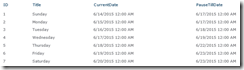
This is only to ensure that the formula will work properly for each day of the week. Check it to ensure the day counts are correct. Once done, you can delete them all if you like or leave them, doesn’t matter. I deleted them and just left one item. Now we turn our attention to the workflow. As a reminder, our reusable workflow is running on the forms library. What we want to do is in context for each approver level, perform the following process:
■Update the CurrentDate field in the CalcWorkingDays list, lookup the item by ID=1, to the current date (will be 12:00 AM as you can’t get the current date AND time)
■Pause for 1 minute
■Set the value of the PauseTillDate to a variable called TempDate
■This gives us the DATE of the proper 2 working days from now, but we need to set the time to be due at 5pm
■Use a Change the time portion action of the TempDate variable value to 17:00 and output that to another variable called Level1DueDate
■Now we have our desired 5pm two working days from now
■Send an email to the approver using this Level1DueDate variable
■Pause until Level1DueDate
Works beautifully! I have 3 layers in my workflow, and I repeat the same process for each layer of approver. I use all the same variables except for the Level1DueDate. I make a new variable to keep the final 2 working days due date for each approver due date, like Level2DueDate. Each approver gets the email, opens the form and clicks an Approve button which stores their username and date/time in the form and saves. Once the workflow wakes up from pause, we check if that level approver name is blank, and act accordingly. Mission accomplished!
Solution 2 – Use Workflow Extensions in Context
What if you don’t want to use another list, and purely want a workflow? Do I have to write a Visual Studio workflow? Nope! Yes, you still have to use custom code, but guess what. There are multiple software vendors that make workflow extensions and guess what they can do – provide an action to execute code in-line at runtime! I haven’t researched extensively, but I know of these two in no particular order:
1.Harepoint Workflow Extensions
2.SharePoint Workflow Activity Extensions by Virto Software
Just add your favorite execute custom code action, paste in the C# code to do the calculation, and you’re ready to go!
A Free Alternative – Not Tested
I’ll freely admit I haven’t tested this, but it would work in theory. In the free edition of the Harepoint extensions, it has some DateTime functions. One I noticed was:

So you could in theory, do all the formula with workflow actions. This returns a numeric value for the day of the week (1 for Sunday, 2 for Monday and so on). Then you could say if 1, add 2, if 2, add 2, etc. Basically doing the same thing as your calculated formula, but with workflow actions.
At this point you should have a couple ways to accomplish whatever you’re trying to do with working days. I hope it was useful!
If you need assistance with or would like to discuss your HR New Hire Onboarding processes or any other SharePoint workflows, contact us!
This article was first published by C5insighyt.




