









SharePoint and OneDrive: How to Create Shortcuts for Faster and Easier Collaboration

Contents
How to Create Shortcuts for Faster and Easier Collaboration
One of the challenges of working with digital documents is how to organize them in a way that makes sense for you. Different people have different preferences and habits when it comes to file management. Some like to create folders and subfolders for every project, topic, or category. Others prefer to keep everything in one place and use tags, filters, or search functions to find what they need. And some may use a combination of both methods or something else entirely.
Whatever your style, there is a feature that can help you access your SharePoint documents more easily and efficiently: OneDrive shortcuts. Shortcuts are links that you can create from SharePoint document libraries to your OneDrive. They allow you to create your own structure and organization for your files and folders, without affecting the original location or permissions of the documents. In this blog post, I will show you how to create shortcuts from SharePoint document libraries to your OneDrive and how to use them effectively.

Create a shortcut from a SharePoint document library
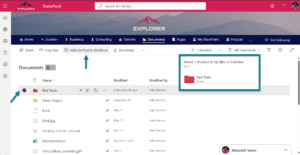
To create a shortcut from any file or folder that exists in a SharePoint library you should do the following:
- Select the file or folder you want to create a shortcut for, if you want to do it for multiple files or folder you will have to do it one at a time
- At the top bar click in the Add shortcut to OneDrive button
- Once the shortcut is added to your OneDrive you will see a successful message on the library
How to access and manage shortcuts in OneDrive
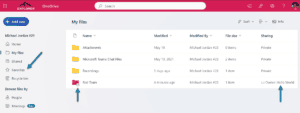
To access and manage your personal shortcuts you will need to open OneDrive, the shortcuts are added to your list of files as any other file you may have stored already.
- In the OneDrive landing page click on My Files
- The shortcuts are identified by a small arrow next to the icon and in the sharing column by the name of the original location/owner of the file
I hope this blog post has helped you understand how to create and use OneDrive shortcuts from SharePoint document libraries. Shortcuts are a powerful and convenient way to access your SharePoint documents from your personal OneDrive, without affecting the original location or permissions of the files. You can create your own structure and organization for your files and folders, and sync them to your devices for offline or mobile access. You can also rename, move, or favorite your shortcuts as you need to make them match the document structure that is more efficient for you. By using OneDrive shortcuts, you can enhance your productivity and collaboration with SharePoint documents.
One more thing to keep in mind is that file shortcuts can only be added through OneDrive Web, SharePoint Web, and Teams. However, once you create them, you can access them across OneDrive Web, SharePoint Web, OneDrive iOS & Android, OneDrive Sync Client, and Teams. There is no meaningful distinction in file shortcut access behavior across these endpoints, so you can enjoy the same experience and functionality wherever you work.
About the Author:
Hey tech-savvy friends! 👋
I’ve been working with Microsoft Technologies over the last ten years, mainly focused on creating collaboration and productivity solutions that drive the adoption of Microsoft Mode
Workplace.
Reference:
Ferreira, J. (2023). SharePoint and OneDrive: How to Create Shortcuts for Faster and Easier Collaboration. Available at: https://sharepoint.handsontek.net/2023/11/07/sharepoint-onedrive-create-shortcuts-faster-easier-collaboration/#google_vignette [Accessed: 2nd May 2024].