



CSOM PowerShell script to generate report of Document Library

Introduction
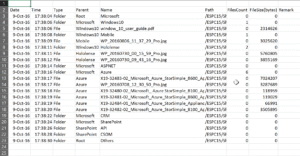
Ever wanted to know the list of documents, file size, checked out details and the folder and file count? This blog I will run through the CSOM PowerShell script to get the details of the file and folder in a document library. The script will iterate all folders and files recursively to get the file details. The details are saved as a csv file later can be used to publish as report. The below script also can be fine-tuned to run it for particular folder. The below script will get the details like
- File Name
- Folder Path
- File Size
- Error details if any
You can also extend it to include fields like File.LockedBy ,CheckedOut with version details, author & editor details.
Code
Add-Type -Path "C:\Microsoft.SharePoint.Client.dll"

Add-Type -Path "C:\Microsoft.SharePoint.Client.Runtime.dll"


$now=Get-Date -format "dd-MMM-yy,HH:mm:ss"

$fileFormat = Get-Date -format "dd-MMM-yy_HHmmss"

Write-Host "Script Start : '$($now)'" -ForegroundColor Yellow

$global:SourceCount = 0    ### To know the total count of the documents to be processed

$global:Processed = 0

$global:OutFilePath = "C:\Reports\files_" + $fileFormat + ".csv"


$header = "Date,Time,Type,Parent,Name,Path,FilesCount,FileSize(bytes),Remark"

Add-Content -Path $global:OutFilePath -Value "`n $header"


$username = "username@domain.com"

$password = ""

$srcUrl = "" ### https://domain/sites/

$srcLibrary = "Documents"

$securePassword = ConvertTo-SecureString $password -AsPlainText -Force

$credentials = New-Object Microsoft.SharePoint.Client.SharePointOnlineCredentials($username, $securePassword)


### function to create a log for the report in csv

function WriteLog

{

param (

[Parameter(Mandatory=$true)] $type, $folderName,$name,$path,$fileCount,$fileSize,$remark

)

$nowTime=Get-Date -format "dd-MMM-yy,HH:mm:ss"

$folderName = $folderName.replace(",","|") ### sometime folder / file name has comma so replace it with something

$name = $name.replace(",","|")

$path = $path.replace(",","|")

$lineContent = "$($nowTime),$($type),$($folderName),$($name),$($path),$($fileCount),$($fileSize),$($remark)"

Add-Content -Path $global:OutFilePath -Value "$lineContent"

$global:Processed = $global:Processed +1

}


function ScanFolders

{

param (

[Parameter(Mandatory=$true)] $srcfolder, $parentName

)

$remarkDetail = ""

$replacedUser=""

Write-Host "Total Count: $($global:SourceCount) Completed: $($global:Processed)" -ForegroundColor Cyan

Write-Host "Navigate to: " $srcfolder.ServerRelativeUrl -ForegroundColor Yellow


$folderItem = $srcfolder.ListItemAllFields

#$srcContext.Load($f)

$srcContext.Load($folderItem)

$srcContext.ExecuteQuery()


$authorEmail = $folderItem["Author"].Email

$editorEmail = $folderItem["Editor"].Email


$filepath = $folderItem["FileDirRef"]

#$fileSize = $fItem["File_x0020_Size"]

$fileName = $srcfolder.Name


$fileCol = $srcfolder.Files

$srcContext.Load($fileCol)

$srcContext.ExecuteQuery()


WriteLog "Folder" $parentName $fileName $filepath $fileCol.Count 0 $remarkDetail


foreach ($f in $fileCol)

{

$remarkDetail = ""

$replacedUser=""


$fItem = $f.ListItemAllFields

#$srcContext.Load($f)

$srcContext.Load($fItem)

$srcContext.ExecuteQuery()


$authorEmail = $fItem["Author"].Email

$editorEmail = $fItem["Editor"].Email


$filepath = $fItem["FileDirRef"]

$fileSize = $fItem["File_x0020_Size"]

$fileName = $fItem["FileLeafRef"]

WriteLog "File" $srcfolder.Name $fileName $filepath 0 $fileSize $remarkDetail

}


$fL1FolderColl = $srcfolder.Folders

$srcContext.Load($fL1FolderColl);

$srcContext.ExecuteQuery();

foreach ($myFolder in $fL1FolderColl)

{

$srcContext.Load($myFolder)

$srcContext.ExecuteQuery()

ScanFolders $myFolder $srcfolder.Name

}

}


### The script starts here to run ####

Write-Host "Authenticating ..." -ForegroundColor White

$srcContext = New-Object Microsoft.SharePoint.Client.ClientContext($srcUrl)

$srcContext.Credentials = $credentials

$srcWeb = $srcContext.Web

$srcList = $srcWeb.Lists.GetByTitle($srcLibrary)

$query = New-Object Microsoft.SharePoint.Client.CamlQuery

$listItems = $srcList.GetItems($query)

$srcContext.Load($srcList)

$srcContext.Load($listItems)

$srcContext.ExecuteQuery()

$global:SourceCount = $srcList.ItemCount

Write-Host "Total Count: $($global:SourceCount)" -ForegroundColor Cyan

foreach($item in $listItems)

{

if($item.FileSystemObjectType -eq "File")

{

$remarkDetail = ""

$replacedUser=""

$srcF = $item.File

$fItem = $srcF.ListItemAllFields

$srcContext.Load($srcF)

$srcContext.Load($fItem)

$srcContext.ExecuteQuery()


$authorEmail = $fItem["Author"].Email

$editorEmail = $fItem["Editor"].Email


$filepath = $fItem["FileDirRef"]

$fileSize = $fItem["File_x0020_Size"]

$fileName = $fItem["FileLeafRef"]

WriteLog "File" "Root" $fileName $filepath 0 $fileSize $remarkDetail


}

elseif ($item.FileSystemObjectType -eq "Folder")

{

$srcContext.Load($item)

$srcContext.ExecuteQuery()

$folder = $srcWeb.GetFolderByServerRelativeUrl($item.FieldValues["FileRef"].ToString())

$srcContext.Load($folder)

$srcContext.ExecuteQuery()

ScanFolders $folder "Root"

}

}

$now=Get-Date -format "dd-MMM-yy,HH:mm:ss"

Write-Host "Total Count: $($global:SourceCount) Completed: $($global:Processed)" -ForegroundColor Cyan

Write-Host "END Start : '$($now)'" -ForegroundColor Yellow
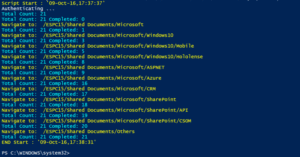
Sample Script Output

Generated Report Output Sample (csv)