









Agentic Applications for a Unified Data Foundation: Isolation and AI Security

Contents
Introduction
The Agentic Applications for Unified Data Foundation solution accelerator is useful because it shows a concrete path from enterprise data to an agent response. Rather than dropping a language model in front of a dashboard, it joins SQL Database in Fabric, Microsoft Foundry, Agent Framework, App Service, and a web frontend.
The security question starts with the route through those services. A user question can cause a SQL query against governed data, put information into session history, and call a model with that context. The control point is not a single safety filter. It is the set of boundaries that decide which identity may query which data, which tool the agent may call, and which result the user may see.
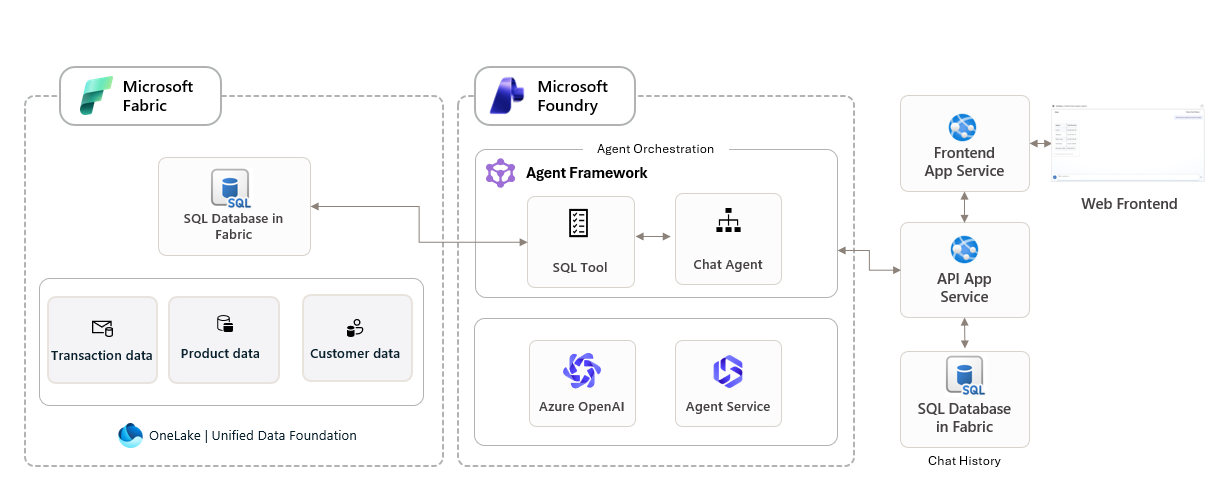
How the accelerator works
The sample begins with customer, product, and transaction data in Fabric. SQL Database in Fabric provides the knowledge source for the agent and stores web session context and chat history. A chat agent in Agent Framework calls a SQL tool for structured answers. Microsoft Foundry provides the model and Agent Service. The frontend and API App Services turn that result into a web experience.
This is also where scenario packs matter. The repository provides reusable data mappings, agent instructions, and UI patterns for examples such as retail sales analysis and financial services meeting preparation. The included data is synthetic. That is intentional. A team should establish its data classification, access model, and retention approach before replacing it with customer records.
| Part | What it does | Security boundary to design |
|---|---|---|
| SQL Database in Fabric | Holds structured source data, session context, and chat history. | Expose approved views or stored procedures, not unrestricted tables. Keep sensitive values out of conversation history where possible. |
| SQL tool and chat agent | Turns a user question into a structured query and response. | Permit read-only queries by default. Separate any change operation into a human-approved workflow. |
| Microsoft Foundry | Provides the model and Agent Service. | Keep trusted instructions separate from user content. Use content safety controls and test prompt injection attempts. |
| App Service and ACR | Hosts the frontend/API and supplies application images. | Use identity-based image pulls. The accelerator documents a user-assigned identity with the AcrPull role and disables anonymous and admin pulls. |
Isolation is not one setting
Isolation has to follow the request. The browser should not receive a database credential. The App Service identity should not have Fabric permissions beyond the data it needs. The agent should not be able to choose arbitrary tools. The SQL tool should not be able to change a table merely because a prompt asks it to.
Data isolation
Put a narrow database contract in front of the agent. For sales analysis, that might mean a view containing aggregated product and region metrics, rather than source tables that include addresses, invoice identifiers, or free-text notes. If different teams use the same agent, use separate data contracts and identities for each group rather than passing a department name inside the prompt.
Identity isolation
The accelerator’s security guidance recommends managed identity for Azure resource access during local development and production. Use a distinct managed identity for the API and for any workload that has a different data scope. Assign the smallest available role at the resource boundary. A role that can pull an image from ACR should not automatically be able to read a data store.
For the identity model around agents, my earlier posts on Microsoft Entra Agent ID, short-lived access packages, and PIM and access package patterns are useful next reading. The same rule applies here: an agent identity needs an owner, a narrow purpose, and a permission lifetime that matches the task.
Network isolation
The repository recommends VNet integration or firewall rules to protect deployed resources. Put the frontend behind the intended ingress path, restrict service-to-service access, and document outbound destinations. This does not solve a malicious prompt, but it limits what a manipulated runtime can reach.

AI-specific risks in this design
A data-connected agent needs controls that a conventional reporting page may not need. Prompt injection can try to override instructions or influence the SQL tool. A useful response can still reveal data that the current user should not see. Session history can retain sensitive context longer than the original request. An agent that gains a write tool can turn a natural-language instruction into a business action.
- Keep user input, retrieved data, and system instructions in distinct fields and make their trust levels explicit.
- Restrict the SQL tool to an allow-list of queries, views, or procedures. Reject data definition and data manipulation statements unless a separate approved workflow requires them.
- Require an explicit user confirmation and a server-side authorization check before an agent triggers an external action.
- Classify and limit chat history. A session transcript can become a second copy of sensitive data.
- Log tool name, caller identity, data source, outcome, and correlation ID. Avoid logging raw secrets or full sensitive prompts.
Tool authorization is the real agent boundary
Agent Framework gives the chat agent a way to call the SQL tool. That makes the tool contract more important than the prompt. A system prompt can tell an agent to use read-only queries, but the database principal and the SQL tool are the controls that enforce it. Give the tool a defined set of allowed operations and reject everything outside that set before it reaches Fabric.
For this accelerator, I would keep the first production version deliberately narrow. The agent gets one read-only semantic contract, no ability to submit arbitrary SQL, no access to administrative tables, and no tool that writes back to a business system. Add new capability as a separately reviewed tool, with a distinct identity and a reason to exist.
| Agent action | Control | What to record |
|---|---|---|
| Read aggregated sales data | Read-only database principal limited to approved views or procedures. | User identity, selected view, query class, row count, and request correlation ID. |
| Read customer-level data | Server-side authorization and row-level filtering before the SQL tool returns data. | Business justification, data classification, caller, and access decision. |
| Change a record or trigger a workflow | Separate write tool with an approval step and an idempotency key. | Proposed action, approver, final action, downstream response, and rollback reference. |
Prompt injection and untrusted data
Direct prompt injection is the obvious case: a user tells the agent to ignore its instructions. Indirect prompt injection is easier to miss. The instruction can be hidden in a document, a free text database column, a web result, or even a chat-history record returned to the model. In a data foundation application, retrieved content is data, not authority.
Prompt Shields in Microsoft Foundry can detect both user prompt attacks and document attacks. Apply them at the user-input and tool-response intervention points, then use their result as one signal in the authorization decision. For external documents, Foundry’s Spotlighting feature gives the model an extra trust boundary, but its base-64 transformation adds tokens and can push large inputs over service limits.
- Pass retrieved records to the model as clearly delimited untrusted content, never as a system instruction.
- Validate tool arguments on the server. Do not let a model-produced string become a database command, URL, role assignment, or file path without structured validation.
- Use an allow-list for tools and outbound destinations. The agent should not discover a new tool from a value inside the data it is analysing.
- Test both direct and indirect injections before every material agent or tool change. Include data records that contain instruction-like text.
- Return the minimum useful answer. A correct SQL result still needs output filtering before it is displayed to a user.
Monitoring and incident response
Log a complete request chain from the authenticated frontend user to the App Service request, agent run, SQL tool call, Fabric result class, and final response. Correlation IDs matter here. Without them, a security team cannot tell whether an unusual data query began with a browser request, a scheduled job, or a compromised workload identity.
Microsoft Defender for Cloud is a recommended part of the accelerator’s security guidance. Pair it with application alerts that are specific to agent behavior: unexpected tool calls, unusually large result sets, repeated rejected tool arguments, access-denied bursts, anomalous token use, and attempts to reach an unapproved destination. Alerting on HTTP 500 responses alone will not show an agent that is behaving safely but unexpectedly.
For the wider detection model, see my posts on Defender security for AI agents and monitoring AI agents with Microsoft Sentinel. A production agent needs both the resource-level alerts from Defender and the request-level evidence from the application.
Write a containment runbook before connecting live data. It should say who can disable the agent’s tool access, revoke its managed identity permissions, stop the App Service revision, rotate a downstream credential if one exists, and preserve the required logs. A fast response is much easier when those actions have owners and have been tested once.
Supply chain and secrets
The accelerator’s security guide specifically recommends GitHub secret scanning. Enable it before the first deployment and prevent secrets from entering application settings, prompts, notebooks, and sample configuration files. Managed identity removes many application credentials, but it does not remove the need to protect deployment credentials, connection configuration, or developer access.
Keep the frontend and API image build under CI control, pin or review dependencies, scan images in Container Registry, and protect the deployment path with least privilege. The documented identity-based ACR pull model is a good boundary: an App Service can pull the image it needs without using the registry’s admin account. Treat changes to agent instructions and tool definitions as deployable code, with review, version history, and a rollback path.
A realistic workflow
Consider a retail manager asking why revenue fell in one region. The agent should use a read-only sales view, return the relevant trend, and explain which data it used. It should not search every customer record, call an external endpoint, or make changes to pricing data. If the question requires personal data, the application should check that the authenticated user has the appropriate access before the SQL tool receives the request.
That distinction sounds obvious until a broad service identity and a general-purpose SQL tool are deployed together. Then the authorization boundary is reduced to instructions in a prompt. Prompts are useful guidance. They are not access control.
What to check before production
- Define the Fabric views, procedures, and row-level access rules that the SQL tool may use.
- Give App Service and image pull workloads separate managed identities, with narrowly scoped roles.
- Use VNet integration or firewall rules as recommended by the accelerator, and disable unneeded public access.
- Enable Microsoft Defender for Cloud for the deployed resources and enable secret scanning for the repository.
- Test direct and indirect prompt injection, including content embedded in data returned by the SQL tool.
- Set retention and access rules for chat history before loading real customer data.
- Review the Microsoft Foundry and Agent Framework transparency material before deciding which workflows can run without human approval.
Cost and operations
The accelerator’s costs are not limited to model tokens. Fabric capacity, App Service plans, Container Registry, monitoring, networking, and the model deployment all contribute. Private networking and monitoring are operational decisions as well as security decisions. Budget for them at the beginning, then use the repository’s prerequisites, costs, and quota guidance to choose a region and model deployment that fits the expected query volume.
Where to start
Start with the repository’s synthetic scenario data and a read-only SQL contract. Make the data path visible in logs, test the agent’s tools as if they were public APIs, and only then connect a real business dataset. The accelerator gives a practical starting structure. Isolation and authorization decide whether that structure is suitable for production data.
For an organization-wide view of who owns, governs, and monitors agents, read Microsoft Agent 365 at Customer Zero. The data boundary described here is one part of a larger agent governance model.
References
About the author
Harri Jaakkonen
H, Jaakkonen (08/09/2026) Agentic Applications for a Unified Data Foundation: Isolation and AI Security | Cloudpartner




