









Microsoft Fabric from A to Z — Part 1: Choosing the Right Ingestion Option for Your Use Case

- Introduction
- The Four Ingestion Options in Microsoft Fabric
- Option 1 — Data Pipelines: The Universal Orchestrator
- Option 2 — Dataflows Gen2: The Power of Power Query Inside Fabric
- Option 3 — Notebooks (PySpark): Full Control
- Option 4 — Shortcuts: When the Data Is Already There
- Can You Combine Multiple Options?
- Summary
- About the author
Contents
- Introduction
- The Four Ingestion Options in Microsoft Fabric
- Option 1 — Data Pipelines: The Universal Orchestrator
- Option 2 — Dataflows Gen2: The Power of Power Query Inside Fabric
- Option 3 — Notebooks (PySpark): Full Control
- Option 4 — Shortcuts: When the Data Is Already There
- Can You Combine Multiple Options?
- Summary
- About the author
Introduction
Every data pipeline starts with the same question: how do you get data into the platform?
It sounds simple — but the answer directly impacts performance, cost, maintainability, and data freshness. Choosing the wrong ingestion tool can mean weeks of fixing problems that could have been avoided from the start.
Microsoft Fabric offers several ingestion options, each designed for specific use cases. This article compares them and helps you pick the right one for your situation.
The Four Ingestion Options in Microsoft Fabric
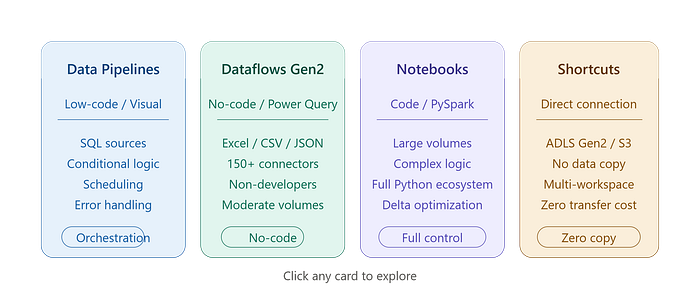
Tool Profile Best for Data Pipelines Low-code / visual Complex orchestration, multiple sources, conditional logic Dataflows Gen2 No-code / Power Query Simple transformations, moderate volumes, non-developer teams Notebooks (PySpark) Code / Python Custom ingestion, large volumes, complex logic Shortcuts Direct connection Data already in Azure (ADLS, S3…) — no copy needed
Let’s go through each one.
Option 1 — Data Pipelines: The Universal Orchestrator
What it is
Data Pipelines in Fabric (inherited from Azure Data Factory) let you visually build ingestion flows by chaining activities together: copy data, trigger a notebook, run a stored procedure, send an alert on failure…
When to use it
- The source is a relational database (SQL Server, PostgreSQL, Oracle, MySQL…)
- You need to handle conditional logic (if the table is empty → overwrite mode, otherwise → incremental mode)
- The pipeline must orchestrate multiple steps in sequence (ingestion → transformation → quality checks)
- Scheduled runs are required (every day at 2am, every hour…)
Two ingestion modes to know
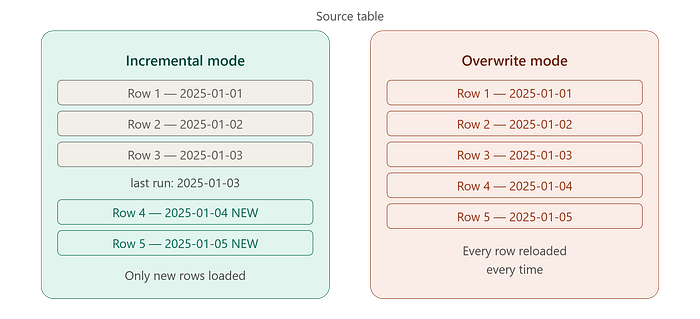
Incremental mode Loads only the new or modified rows since the last run. Usually relies on a datetime field (creation or modification date) or an incrementing identifier.
Advantages    : fast, cost-efficient, minimal network load
Disadvantages : requires a reliable watermark field in the source
Best for      : transactional tables (orders, sales, events)
Overwrite mode (full reload) Reloads the entire table on every run. Simple to set up, but expensive on large tables.
Advantages    : simple, reliable, no dependency on a watermark field
Disadvantages : slow on large volumes, high network load
Best for      : reference tables (products, customers, stores), small stable tables
Comment ça marche ??

A typical pipeline structure
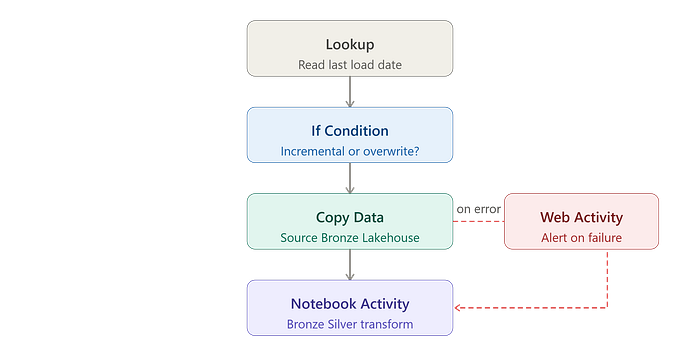
[Lookup] — reads the last load date from a parameters table
    ↓
[If Condition] — incremental if a date exists, overwrite otherwise
    ↓
[Copy Data] — extracts data from the source and writes it to Bronze in the Lakehouse
    ↓
[Notebook Activity] — triggers the Bronze → Silver transformation
    ↓
[Web Activity] — sends a Teams/email alert on failure
💡 Best practice: Store ingestion parameters (table name, last load date, mode) in a dedicated
pipeline_configtable in the Lakehouse. This makes each pipeline generic and reusable across any source table.
Option 2 — Dataflows Gen2: The Power of Power Query Inside Fabric
What it is
Dataflows Gen2 expose the Power Query interface — the one millions of users already know from Excel and Power BI Desktop — directly inside Microsoft Fabric. Every transformation step is represented visually, with a live data preview at each stage.
When to use it
- The source is a flat file (Excel, CSV, JSON) or a REST API
- Transformations are straightforward: filters, renames, table merges, pivots
- The team includes data analysts or non-developers
- Data volumes are moderate (a few million rows at most)
What Dataflows Gen2 can do
- Connect to 150+ data sources natively (SharePoint, Salesforce, Google Analytics, SQL databases, APIs…)
- Filter, rename, merge, and pivot columns without writing a single line of code
- Write results directly to a Lakehouse or a Fabric Warehouse
- Integrate into a Data Pipeline as just another activity
Limitations to keep in mind
- Less performant than Spark on very large volumes
- Less flexible for highly complex transformation logic
- Debugging can feel less intuitive than a notebook for technical profiles
Option 3 — Notebooks (PySpark): Full Control
What it is
Fabric Notebooks let you write Python/PySpark code with native access to the Lakehouse, the distributed Spark runtime, and the full Python ecosystem of libraries.
When to use it
- Data volumes are very high (tens or hundreds of millions of rows)
- Ingestion logic is complex: advanced deduplication, non-standard format parsing, API-based enrichment…
- You need fine-grained performance control: partitioning, Delta read/write optimization
- The team is comfortable with Python / PySpark
Example: incremental ingestion from ADLS in PySpark
from pyspark.sql import functions as F
from delta.tables import DeltaTable
# Parameters
source_path = "abfss://raw@mylake.dfs.core.windows.net/orders/"
target_table = "Tables/bronze/orders"
watermark_col = "modified_date"
# Read the last loaded date
last_load = spark.sql("SELECT MAX(modified_date) FROM bronze.orders").collect()[0][0]
# Read only new data
df_new = (
    spark.read.format("parquet").load(source_path)
    .filter(F.col(watermark_col) > last_load)
)
# Append to the Lakehouse
df_new.write.format("delta").mode("append").save(target_table)
print(f"{df_new.count()} new rows ingested.")
💡 Best practice: Use Delta Lake format for all tables in your Lakehouse. Delta natively supports ACID transactions, time travel (querying a previous version of your data), and automatic file optimization with
OPTIMIZEandZORDER.
Option 4 — Shortcuts: When the Data Is Already There
What it is
Shortcuts are a feature unique to Microsoft Fabric. They let you reference existing data (in Azure Data Lake Storage, Amazon S3, Google Cloud Storage, or another Fabric Lakehouse) without physically copying it.
The Lakehouse sees the data as if it were its own — while the data stays at its original location.
When to use it
- Data is already stored in ADLS Gen2 or S3
- You want to avoid data duplication and the associated transfer costs
- You need to share data across multiple Fabric workspaces without copying
- The data is managed by another team and is already available in the cloud
What Shortcuts don’t do
A Shortcut does not transform data. It gives read access to data as-is. If transformation is needed, it happens downstream via a Notebook or a Dataflow.
Decision Table: Which Option Should You Choose?
Source = SQL database, conditional logic needed
→ Data Pipeline
Source = Excel / CSV files dropped by business teams
→ Dataflow Gen2
Source = REST API with complex pagination and auth
→ Notebook (PySpark)
Data already in ADLS Gen2 or S3
→ Shortcut
Large volume (>100M rows), complex transformation
→ Notebook (PySpark)
Non-technical team, simple transformations
→ Dataflow Gen2
Multi-step orchestration with error handling
→ Data Pipeline
Share data across workspaces without copying
→ Shortcut
Can You Combine Multiple Options?
Yes — and that’s often the best approach.
A real-world project typically combines:
- A Data Pipeline to orchestrate the overall flow and manage scheduling
- Dataflows Gen2 to ingest Excel files dropped by business teams
- PySpark Notebooks for high-volume or complex sources
- Shortcuts to reference data already available in the Data Lake
The key is to choose the tool based on the source and the need — not to use the same tool for everything.
Summary
Ingestion is the foundation of any data pipeline. A poor choice at this stage compounds over time: degraded performance, rising costs, painful maintenance.
Microsoft Fabric offers four complementary options that cover every use case:
- Data Pipelines → orchestration, SQL sources, conditional logic
- Dataflows Gen2 → files, APIs, non-developer teams
- Notebooks (PySpark) → large volumes, complex logic, full control
- Shortcuts → data already in the cloud, cross-workspace sharing
About the author
Manar Jawhari
M, Jawhari (09/07/2026) Microsoft Fabric from A to Z — Part 1: Choosing the Right Ingestion Option for Your Use Case. Microsoft Fabric from A to Z — Part 1: Choosing the Right Ingestion Option for Your Use Case | by Manar Jawhari | Jun, 2026 | Medium
Tags
trending posts




